By Janet Razzak 8/20/26
When someone searches Google for a business like yours, they may never begin by visiting your website.
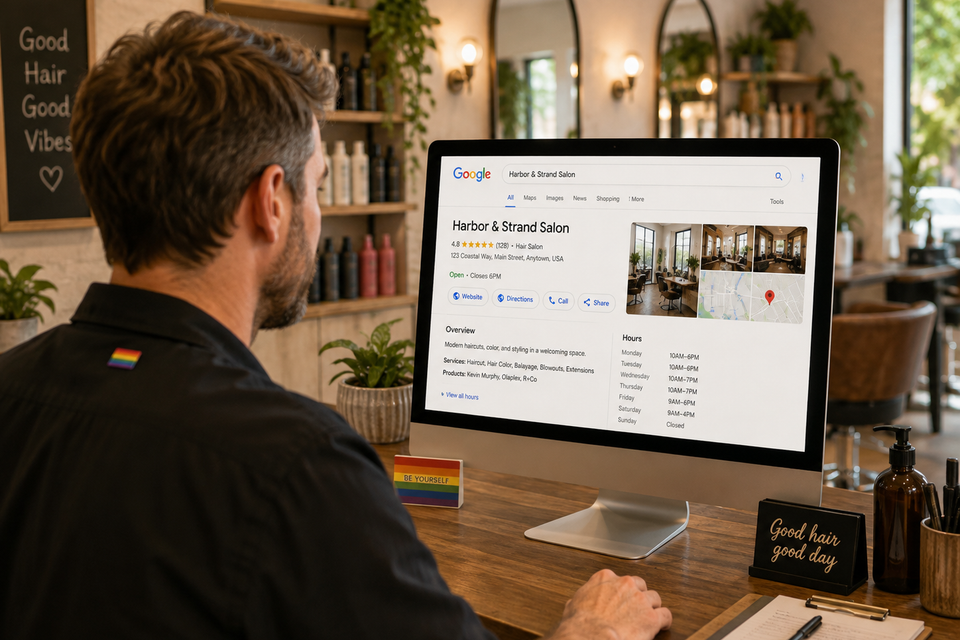
They may start with Google Search or Google Maps — looking for your hours, location, services, reviews, photos, phone number, or directions. A Google Business Profile helps you manage the information they find.
For local and service-based businesses, it can be an important part of being visible where customers are already searching.
What Is a Google Business Profile?
A Google Business Profile is a free business listing that lets an eligible business manage how it appears across Google Search and Google Maps.
Depending on your type of business, your profile may display information such as:
- Business name
- Address or service area
- Phone number
- Website
- Business hours
- Products or services
- Business category
- Photos and videos
- Customer reviews
- Business updates
- Social media links or other contact options, when available
A verified profile also gives you access to performance information that can help you understand how people are finding and interacting with your business.
Why Your Google Business Profile Matters
A Business Profile does more than provide contact information. It gives both Google and potential customers useful context about your business.
Google explains that local search results are mainly influenced by three factors:
Relevance — How closely your business matches what someone is searching for.
Distance — How far your business is from the person searching, or from the location included in their search.
Prominence — How well known or established the business appears to be. Information from across the web, links, reviews, and other signals may contribute to prominence.
You can't pay Google for a better organic local ranking. But you can make it easier for Google to understand your business by keeping your information complete, accurate, and useful.
That is where your Business Profile becomes part of your broader search visibility strategy.
Start With Accurate Business Information
Before worrying about optimization, begin with accuracy.
Your business name should reflect the name you actually use in the real world. Avoid adding extra services, locations, or keywords to the business name simply because you want to appear for those searches.
Your address, service area, hours, phone number, website, categories, and other details should also accurately represent the business.
This is especially important for businesses that travel to customers. If customers do not visit you at your business address, Google generally treats you as a service-area business. Your home or private business address should not be publicly displayed simply to establish a location. Instead, you can identify the areas you serve.
Businesses that both serve customers at a physical location and travel to customers may be considered hybrid businesses.
Create, Claim, and Verify Your Profile
Before you create a new profile, search Google for your business.
A profile may already exist based on information Google has gathered from public sources, directories, customers, or other information online. If your business is already listed but you don't control the profile, you may be able to claim it rather than create another one.
If no profile exists, you can add your business and follow Google's instructions to provide your information.
Google then requires eligible businesses to verify that they are authorized to manage the business.
Verification options vary. Depending on the business, Google may offer video recording, phone or text, email, live video, or mail. Google determines which verification methods are available, and some businesses may be asked to complete more than one method.
Ownership matters. Ideally, the business owner should maintain primary ownership of the profile through a Google Account they control. Employees, website professionals, or marketing partners can be added as owners or managers without sharing passwords or giving away control of the profile.
Choose Your Business Categories Carefully
Categories help Google understand what kind of business you operate.
Your primary category should be the most specific category available that accurately describes the main business. Additional categories can be used when they genuinely describe other important parts of the business.
More categories are not automatically better.
Google recommends using as few categories as necessary to describe the core business rather than treating categories like a list of search keywords.
Think about what your business is, not every individual thing it sells.
A bakery that serves coffee, for example, may still primarily be a bakery. A salon offering several services does not necessarily need a category for every individual service.
Write a Helpful Business Description
Your Business Profile includes space for a short description of your business.
Use it to help a potential customer quickly understand:
What do you offer?
Who do you serve?
Where do you serve them?
What makes your business different or useful?
The description can be up to 750 characters. Google does not allow links in this section and recommends focusing on useful information about the business rather than promotions, prices, sales, or gimmicky language.
You can naturally use words customers would use to describe your services, but write for the customer first. A clear description is more useful than one packed with repetitive search terms.
Add Photos and Videos That Help Customers Understand Your Business
Photos give people another way to decide whether your business feels right for them.
Depending on your business, useful images might include your:
- Logo
- Exterior
- Interior
- Team
- Products
- Completed work
- Services in progress
- Menu items
- Equipment or workspace
For a storefront, exterior photos can also help customers recognize the location when they arrive.
Choose clear, current images that genuinely represent the business rather than adding images simply to fill the profile. Google allows businesses to continue adding photos and videos as the business changes.
Reviews Build Trust — and Deserve Attention
Reviews can be one of the most visible parts of a Google Business Profile.
They help potential customers learn from the experiences of people who have already worked with or purchased from you. Google also states that review count and review scores can contribute to local ranking.
You can ask customers who have genuinely done business with you to leave a review. Google provides businesses with a review link and, on desktop, a QR code that can be shared with customers.
What you should not do is offer discounts, gifts, free products, or other incentives in exchange for reviews. Google considers incentivized reviews a form of fake engagement.
Responding to reviews is valuable, too.
A thoughtful response shows future customers that someone is paying attention. Positive reviews deserve appreciation, while negative reviews should be handled professionally and constructively. Your reply is public, so think of it as communication not only with the reviewer but with everyone who may read it later.
Use Posts to Keep Customers Informed
Google Business Profiles still allow businesses to publish posts directly to their profiles.
Current post types include:
Updates for general news or announcements
Offers for promotions and specials
Events for upcoming activities
Posts can include text and, depending on the type, photos, videos, links, dates, and action buttons.
They can be useful for telling customers what is happening now — a seasonal service, a new offering, an upcoming event, changed hours, or something else worth knowing.
Think of posts primarily as a way to communicate with customers who encounter your profile rather than as a shortcut to higher search rankings.
Make It Easy for Customers to Take the Next Step
Depending on your business category and location, Google may provide additional profile features.
These can include service listings, menus, booking or appointment links, social media links, ordering options, and other business-specific attributes.
Some verified Business Profiles may also have the option to add a text-message number or WhatsApp link. These options are not available to every business or in every region. Google's older built-in Business Profile chat system was discontinued in 2024.
Use the features that genuinely make it easier for your customers to take action.
Keep Your Profile Current
Creating the profile is only the beginning.
Your business changes. Hours change. Team members change. Services evolve. New photographs become available. Holiday schedules come and go.
Your Business Profile should change with you.
Pay particular attention to:
- Regular and holiday hours
- Phone number and website
- Address or service area
- Categories and services
- Photos
- Business description
- Customer reviews
- Business updates
Google may also receive business information from customers, public websites, licensed sources, and other places online, so it is worth reviewing your profile periodically to make sure the information displayed is still correct.
Learn From Your Performance Information
Once your profile is verified, Google provides performance information that can show how people discover and interact with it.
Depending on the features available for your business, you may be able to see information such as:
- Searches that led people to your profile
- Profile views
- Direction requests
- Calls
- Website clicks
- Bookings or other interactions
Rather than focusing only on how many people viewed the profile, pay attention to what they did next.
Which searches are bringing people to you?
Are people visiting your website?
Are they calling?
Are they asking for directions?
Those patterns can help you better understand what customers are looking for and where your online presence may need improvement.
Your Google Business Profile and Website Work Together
A Google Business Profile does not replace your website.
The profile helps customers discover and quickly evaluate your business within Google. Your website gives you much more room to explain your services, tell your story, answer questions, demonstrate expertise, and guide someone toward becoming a customer.
Google also gathers business information from websites and other public sources when building its understanding of businesses and local search results.
When your Business Profile, website, and other online information tell the same clear story, customers have an easier time recognizing and trusting your business wherever they encounter it.
Start With the Basics
You do not need to master local SEO before creating a useful Google Business Profile.
Start with the fundamentals:
Make sure you control your profile.
Make sure the information is correct.
Describe your business clearly.
Show customers what you do.
Pay attention to reviews.
Keep your information current.
Search visibility grows from helping both people and search engines understand your business clearly.
A complete, accurate Google Business Profile is one practical place to begin.